Hype StackHypeStack
Model Context Protocol, over stdio

Ask your editor
to build it for you.

The installer is also an MCP server. Your agent searches the catalog, plans the install, and writes the files, from a local process on your own machine.

Works inCursorT3 CodeClaude CodeWindsurfVS Code
you, in Cursor

Let people edit the same doc at once

hype-stack mcp
  • Found the packssearch_catalog
  • Checked your licenseplan_install
  • Read your projectinspect_stack
  • Wrote 75 filesadd_packs

In your repo, on your machine. Yours to change.

A

The whole pitch

You ask in the editor. Your app answers.

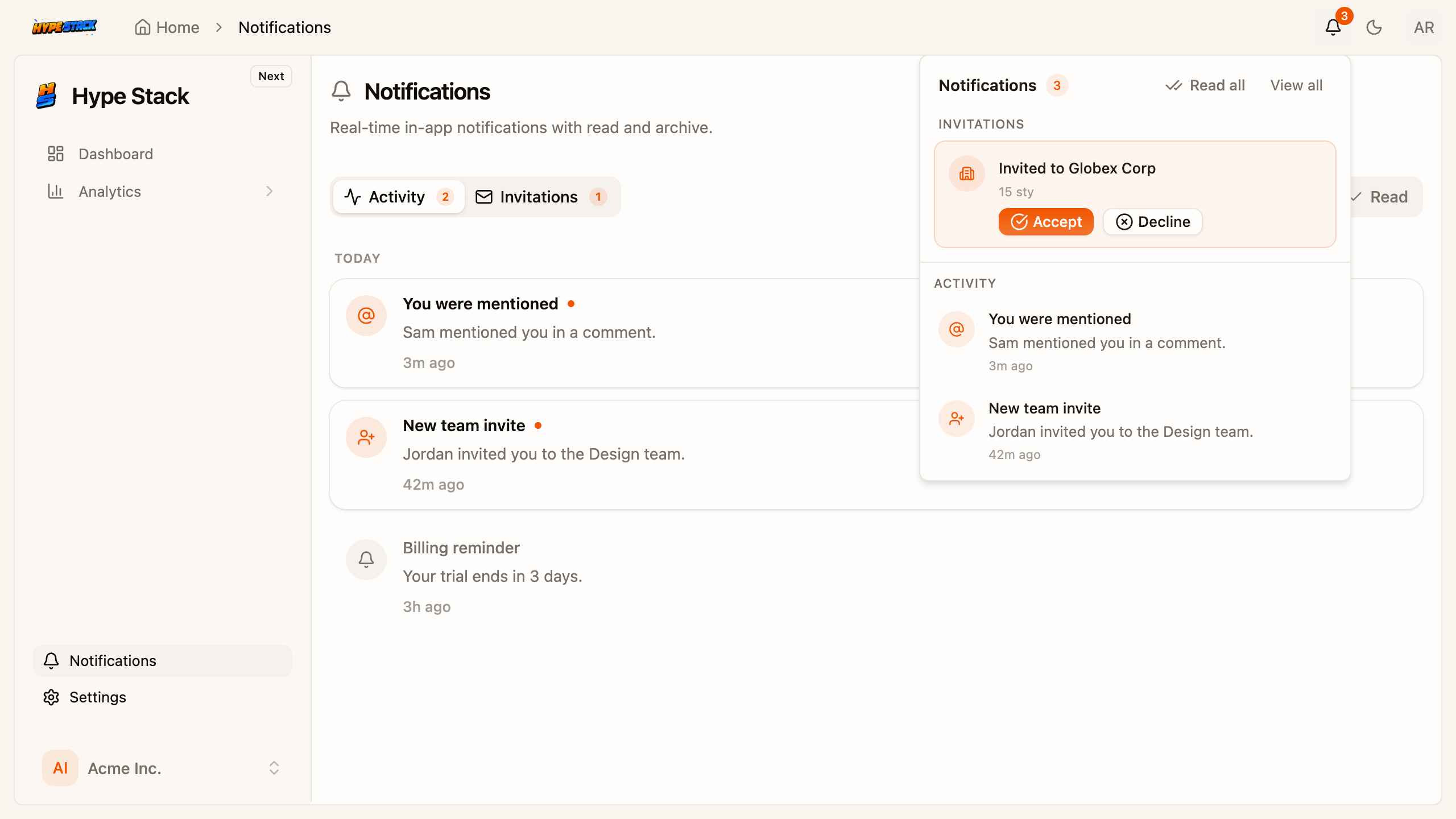
A real capture: the notifications pack, installed by an agent over MCP, running in the app.

CursorMCP

Add in-app notifications

hype-stack mcp
  • Found the notifications pack
  • Planned 63 files, zero conflicts
  • Wrote them into your repo
Ask for the next feature
local process, nothing leaves your machine
Your app, afterlocalhost:3000/notifications
The notifications feature running in the app after the agent installed it
Setup

One command. Once per editor.

Pick your editor, add it once, ask for a feature. No config files to hand-edit.

  1. 1

    Add it

    Add to Cursor

    One click, entry prefilled. If Cursor opens without a dialog, run this instead:

  2. 2

    Restart Cursor

    Installed globally, so the tools are there even in an empty folder.

  3. 3

    Ask for a feature

    Add billing with team seats

Cursor - MCP servers, after
hype-stackconnected
search_catalogplan_installinspect_stackadd_packscreate_application+3 more

That is the whole setup. It follows you into every project.

Signing in, if you need to

Free packs need nothing. Paid ones reuse the CLI login.

On a shared box, an API key as HYPE_STACK_TOKEN works too.

The terminal still does all of this

Nothing is deprecated. The editor is a second door.

See the three CLI commands for the version with prompts.

same packs / same files / same repo
The tool surface

Eight tools. Five of them only look.

The three that write show the plan first and take a conflict policy. It cannot buy packs or run migrations.

5 tools only look

cannot change a file
  • search_catalog{ query: "billing", tier: "all" }

    Finds the right feature

    Packs and templates by keyword, category, or price tier.

  • plan_install{ packs: ["pack-billing-stripe"] }

    Checks before it builds

    Dependency order, what is installed, what your license covers.

  • inspect_stack{ cwd: "." }

    Knows what you already have

    Reads stack.json: installed packs and app paths.

  • env_status{ cwd: "." }

    Spots the missing keys

    Which variables the installed packs still need.

  • auth_status{}

    Knows who you are

    Whether this server is logged in, and the fix.

3 tools write files

plan first, then your call
  • create_application{ name: "atlas", editors: ["cursor", "claude"] }

    Starts a new app

    Clones the template and installs it. Docker stays yours.

  • add_packs{ packs: ["pack-billing-stripe"], onConflict: "keep" }

    Adds a feature

    Installs packs into a project. The conflict policy is required.

  • apply_template{ templateId: "vault", onConflict: "keep" }

    Applies a whole template

    Starter, layout, fixed packs, and the frontend overrides.

What you get

Set it up once. Every project gets faster.

Your agent stops guessing at features and starts installing finished ones. That is days of build time returned per feature.

  • 63

    billing
    47
    notifications
    63
    collaboration
    75
    files per ask

    Files written from one sentence

    The notifications pack: frontend, backend and admin, planned then written.

  • minutes

    agent improvises itdays
    agent installs the packminutes

    For a feature that takes days by hand

    Finished, tested packs instead of an agent improvising billing from scratch.

  • 0

    terminal session
    docs tab
    your editor chat

    Trips out of the editor, ask to running app

    The plan, the files and the result land in the chat you already have open.

Prefer the terminal? Same binary, see the CLI. Want your agent held to the project's conventions? That is the rules and lint setup.

Model Context Protocol

Your editor can install features

Five tools only look. Three write, and they show the plan first.

Every editor

Stay in the window

Cursor, T3 Code, Claude, VS Code. Same server.

Cursor

T3 Code

Claude

Copilot

Read first

It surveys before it builds

Catalog, license, and your stack, before a file is touched.

01

Look around

search_catalog, inspect_stack

02

Check access

plan_install, auth_status

03

Write source

add_packs, same files as the CLI

Then writes

Source in your repo

Same installer as the CLI. Same files.

add_packs · via mcp

A apps/frontend/…/billing/

A apps/backend/…/billing/

M prisma/schema.prisma

ready to review

Guardrails

It cannot spend your money

Missing a license? It names the pack and links it.

  • Read tools never write
  • Paid packs need a credential
  • Same binary as the CLI
Within reach

What one ask can install.

The feature surface behind those eight tools. Your agent installs finished features instead of improvising them.

Full-stack feature packs

One install lands the screens, the API routes, the database schema, and the admin tools together. No half-wired features.

TypeScriptHonoPrisma

SDK that writes itself

Backend routes become a typed frontend SDK automatically. Rename a field and the UI breaks at compile time, not in production.

HyperFetchHonoTypeScript

MCP server

The installer doubles as an MCP server. Your agent searches packs, shows the plan, and writes the files without leaving the editor.

CursorClaudeGitHub Copilot

AI-friendly codebase

Tight conventions, focused features, short files. Cursor, Claude and Copilot stay accurate instead of hallucinating as your project grows.

CursorClaudeGitHub Copilot

AI agent rules and skills

13 rules, 5 skills, and 4 lint rules ship in the repo. Your agent reads them before writing and stops guessing at conventions.

CursorClaudeGitHub Copilot

Installs that ask first

Compose plans every file before it writes anything and waits for your yes. You review a plan, not a surprise diff.

TypeScript

Feature packs to grow with

Every pack ships real source code: frontend, backend, and admin surfaces where the feature needs them. Add them when you need them, one command each.

Questions, answered

Yes. Everything lands as plain source in your repository: frontend, backend, admin, database schema. There is no runtime dependency on us and nothing phones home.

Add it once. Use it on every project.

Installed globally, the tools are there even in an empty folder. So your agent can create the project too.

local process / 5 of 8 tools read-only